Priority Lanes
What you'll learn
- Why treating every update equally breaks interactivity
- What a "lane" is, and the priority families from clicks down to idle work
- How React decides an update's lane, by context, not mind-reading
- The four key behaviors: preemption, batching, entanglement, and expiration
- A full trace: typing, a heavy filter render, and a click fighting for the thread
Time slicing lets React pause work. Pause for what? If a hover highlight and a "Buy now" click both need the thread, which goes first? A scheduler without priorities is only a pause button. This chapter is React's answer: every update gets a priority, and urgent work is allowed to push in front.
Not all updates are equal
Compare two setState calls:
- One from clicking Buy now, the user is staring at the button, expecting a response now.
- One from a filter recomputing 5,000 rows, the user will tolerate the results taking a beat.
If React worked through these strictly in arrival order, a heavy filter render started one millisecond earlier would delay the click by hundreds of milliseconds. One thread plus fairness requires knowing what matters more.
The lane model
Jargon: "lane". A numbered priority slot that every update is assigned to. React has about 31 lanes, stored internally as bit flags so they can be compared and combined with cheap bitwise math, and grouped into a handful of priority families.
Think of a toll plaza with ~31 numbered booths. Cars carry different passes: emergency vehicles, commuters, delivery trucks. The attendant always serves the most urgent non-empty lane first, and a truck is never offended that an ambulance went ahead.
From most to least urgent, the families are:
- Synchronous / discrete, one-shot interactions expecting an immediate response: clicks, key presses, taps.
- Continuous, streams of events that must keep up but can be coalesced: scroll, mousemove, drag. Missing one intermediate mousemove is fine; the latest position is what matters.
- Default, the ordinary case: network responses, timers, plain
setStatecalls outside any special context. - Transition, updates you explicitly mark as non-urgent (the
startTransitionAPI, two chapters from now). - Retry, re-render attempts after a suspended component's data arrives.
- Idle / offscreen, work for content that isn't visible, like pre-rendering a hidden subtree. Runs only when there's literally nothing better to do.
Jargon: "discrete event". An input event that happens once and expects a complete response (a click, a key press). Contrast with "continuous event", a firehose of events (mousemove, scroll) where only the newest really matters.
How an update gets its lane: context
React cannot read your mind, so it reads the situation. The lane is inferred from where the update was scheduled:
setStateinside a click or keydown handler → discrete lane.setStateinside a scroll or mousemove handler → continuous lane.setStateinside astartTransitioncallback → transition lane.setStateanywhere else (a.then, a timer, a subscription) → default lane.
Pseudocode model, not real source:
What happens: when you click a button, React's event system sets the context to "discrete" before calling your onClick. Any updates you schedule inside inherit that urgency. When your handler returns, the context resets. Your network callback's .then runs under no special context, so its updates are plain default.
Four behaviors that make lanes work
(a) Preemption: urgent work interrupts
If a strictly-more-urgent update arrives while a render is in progress, React abandons the in-progress draft and renders the urgent update first. The discarded draft may be resumed or restarted later, with the newest state. This is why the previous chapter said renders can be "thrown away entirely". Preemption is the main reason.
(b) Batching: same family travels together
Multiple updates in the same family get grouped into one render. Three setState calls in one click handler don't cause three renders, they're the same lane, so they batch. You already rely on this; now you know it's the lane model doing it.
(c) Entanglement: some lanes must commit together
Jargon: "entanglement". A link between lanes forcing them to commit in the same batch, so related state never appears half-updated. If two transitions touch the same piece of state, React entangles them: you get both or neither.
Without entanglement you could see screen A using the new filter with the old sort order, a combination that never logically existed. Entanglement makes mixed states impossible.
(d) Expiration: starvation protection
Jargon: "expiration". Every lane has a patience limit. If low-priority work waits longer than its limit, it "expires" and is promoted to run synchronously, ahead of everything, no matter what else is pending.
Preemption could theoretically starve a transition forever, a user who never stops clicking. Expiration is the fairness valve: wait too long and you become urgent. Nothing in React waits indefinitely.
Picking what to work on
Pseudocode model, not real source:
What happens:
- The scheduler asks: what is the most urgent lane with pending work?
- If nothing is rendering, that lane's render starts.
- If a render is in progress and the new work is the same family, it's merged into the current render, free batching.
- If the new work is less or equally urgent, the current render keeps going. The scheduler does not thrash.
- Only if the new work is strictly more urgent does React throw away the draft and switch. Note the discipline: preemption is exceptional, not the default.
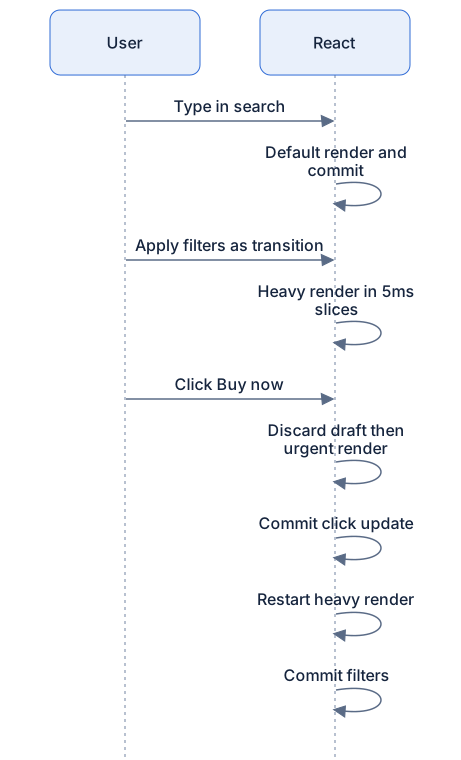
Worked scenario: typing, filtering, buying
A shop page: a search input (typing = default-ish updates), an "Apply filters" button wrapped in startTransition (heavy, ~800ms of rows), and a "Buy now" button (discrete).
What happens:
- You type. Each keystroke schedules a default-lane update. These renders are small; they slice and commit quickly. Typing feels fine.
- You click "Apply filters". A transition-lane render begins, 800ms, spread over ~160 slices. The old screen stays up and fully interactive.
- Mid-render, say slice 40, you click "Buy now". The click schedules a discrete-lane update.
- The scheduler compares: discrete is strictly more urgent than transition → the filter draft is discarded, and the click render runs immediately.
- The click render is small (a pressed state, a cart badge). It commits within a frame or two. The button feels instant.
- Back to the queue: the most urgent pending lane is now the abandoned transition. React restarts the filter render with the latest state, slices through it, and commits.
- The filters appear, later than the click, exactly as they should.
Your experience: typing stayed smooth, the purchase felt instant, and the heavy filter arrived "whenever it could". Nobody told React which of those you cared about in words. The lanes carried that information.
Diagram
Rendered diagram (PNG hi-res):

Rendered diagram (PNG hi-res):
Common misconceptions
- Misconception: Higher priority means faster. Reality: priority only changes ordering. The total work is unchanged; urgent work simply goes first.
- Misconception: React knows what matters to my users. Reality: React knows context, click handler, transition, or neither. Anything beyond that, you must mark yourself (next chapters).
- Misconception: A discrete event jumps the queue instantly. Reality: it preempts, but still runs on the same single thread, it waits at most for the current 5ms slice to end.
- Misconception: An "expired" update is an error. Reality: expiration is the fairness mechanism promoting starved work to run synchronously. It's routine, not exceptional.
- Misconception: Lanes are threads. Reality: all lanes execute on the same one main thread. A lane is a label, not a worker.
Why it works this way
- Humans have a latency hierarchy. A button press must answer in ~100ms; a content swap can lag a second before anyone complains. Priorities map the machine onto human perception.
- Context-based inference is free. Clicks and keys get top priority with zero API surface, you never annotate a click.
- Entanglement prevents impossible states. Committing related updates atomically means the screen always shows a state that logically existed.
- Expiration turns theory into practice. Priority inversion and starvation are classic scheduler bugs; a patience limit makes them impossible.
Try it yourself
- Build a mini-scheduler in a browser console: an array of tasks labeled
'high'or'low', and aworkLoopthat always runs the newest'high'task first. Push one low task, then three high tasks. Expected log: high tasks run first, low task last. - Extend it: push one low task, then a steady stream of high tasks (e.g., 50 of them). Expected: the low task never runs, starvation. Now add expiration ("a low task older than 100ms runs next") and rerun. Expected: the low task runs after the wait. You've rebuilt the lane model's fairness valve.
- Predict the lane for each
setState: insideonClick; insidesetTimeout(..., 200); insidefetch(...).then(...); insidestartTransition. Answers: discrete, default, default, transition. If any surprise you, reread the context rules.
Recap
- Every update is assigned a lane, one of ~31 priority slots grouped into families: discrete, continuous, default, transition, retry, idle.
- Lanes are assigned by context: click handlers → discrete,
startTransition→ transition, everything else → default. - Urgent work preempts less-urgent work mid-render; the draft is discarded and later restarted with newer state.
- Same-family updates batch into one render; entangled lanes must commit together.
- Starved low-priority work eventually expires and runs synchronously, fairness is guaranteed.
- Preemption is disciplined: the current render is abandoned only for strictly more urgent work.