SSR and Hydration
What you'll learn
- Why anyone renders React on a server at all, and what breaks without it
- How the same components produce an HTML string where no DOM exists
- What hydration actually is: adopting server HTML instead of recreating it
- The "uncanny valley": when a page looks alive but clicks do nothing
- What hydration costs, and why React doesn't just rebuild the DOM from scratch
hydrateRootvscreateRoot, and the claiming walk that links your tree to existing HTML
Open a typical client-rendered React app on a slow network and watch closely: a blank white screen, a spinner, then, finally, the UI. Nothing was broken. The app worked exactly as designed. The design just requires downloading, parsing, and running a big pile of JavaScript before a single pixel of content can appear. Server rendering exists to attack that ordering problem.
The problem: JavaScript before pixels
A purely client-rendered app asks the browser to do this:
What happens:
- Download a tiny, nearly-empty HTML file: a
<div id="root"></div>and a<script>tag. - Download the JavaScript bundle (maybe hundreds of kilobytes, compressed).
- Parse and execute it.
- Run your components, which build the element tree.
- Turn the tree into real DOM. Only now does the user see anything.
Steps 2–4 happen strictly before any content. On a fast laptop with good internet, that's a few hundred milliseconds of white. On a mid-range phone on hotel Wi-Fi, it can be many seconds of nothing.
And sometimes it's worse than slow. A search-engine crawler or a link-preview bot (the thing that generates the little card when you paste a URL into a chat app) may not run your JavaScript at all. To them, your beautiful app is an empty div.
The idea: run React where there's no DOM
Your components are just JavaScript functions that return element trees, and you learned back in Part 1 that elements are plain objects, created without touching any DOM. So nothing stops us from running those same components on the server, in Node.js, and walking the resulting tree to produce a string. An HTML string.
Jargon: "server-side rendering (SSR)". Running your React components on the server to produce real HTML, sent in the very first response. The browser can display that HTML immediately, before any JavaScript arrives.
What happens:
- A request for
/productshits your server. - The server calls your component functions, exactly as the browser would, and gets an element tree.
- A server renderer walks the tree and concatenates strings:
<div class="card"><h1>…, plain text. - That text goes into the HTTP response as the page's HTML.
- The browser receives it and paints it. No JavaScript has run yet. Content is already on screen.
Step 3 deserves a pause: on the server there is no document, no DOM nodes, no event listeners. React renders to text there. A <button onClick={…}> becomes the string <button>. The handler simply can't exist in HTML, so it's left behind. The page the user sees first is visually complete but behaviorally empty.
Pseudocode model, not real source:
Notice what's missing from that model: anything browser-shaped. No createElement, no appendChild, no events. Just strings.
Then the JavaScript arrives: hydration
If the story ended there, you'd have a beautiful, lifeless page: a photograph of your app. The onClick handlers, the state, the effects: none of that survives the trip through HTML. So the server also sends the same JavaScript bundle, and when it loads, hydration begins.
Jargon: "hydration". The process where React, in the browser, renders your component tree again and adopts the existing server HTML: matching every internal node to an already-present DOM node, verifying it, and attaching event listeners, instead of creating new DOM from scratch.
The metaphor is in the name: the server sent the dry, dehydrated form of your app, structure without behavior. The JavaScript "adds water" and it comes alive.
Hydration is a render, but a special one. On a normal first render, React creates every DOM node. During hydration, React does the same work, calls your components, builds its internal fiber tree, but when it reaches a host element, it asks a different question:
"Is there already a server-rendered DOM node here I can claim?"
What happens:
- The bundle loads and calls
hydrateRoot(container, <App />). - React renders
App, calling every component function, exactly as a normal render, producing the element tree. - React walks the new tree and the existing server DOM in parallel, in the same order.
- For each host element ("I need a
divwith classcardhere"), it takes the next server node, checks that it matches, and adopts it: the fiber points at that existing DOM node. - Props get processed: attributes already in the HTML are trusted (mostly, mismatches get their own discussion next chapter), and event listeners are attached to the adopted nodes.
- When the walk finishes, every fiber has its DOM node, every handler is wired, and the page is genuinely interactive, all without creating a single new DOM node.
Pseudocode model, not real source:
The two walks stay in lockstep: first fiber with first server node, first child fiber with firstChild, sibling fiber with nextSibling. This is why the server HTML and the client's first render must agree. The whole scheme is "the same tree, twice."
hydrateRoot vs createRoot
The entry point is the one difference you actually type:
import { hydrateRoot } from 'react-dom/client';
import App from './App';

// The server already filled #root with HTML for <App />.
hydrateRoot(document.getElementById('root'), <App />);
Compare with the purely client-side version you know:
import { createRoot } from 'react-dom/client';
import App from './App';

// #root is empty; React will create all the DOM.
createRoot(document.getElementById('root')).render(<App />);
What happens: createRoot(...).render(...) assumes the container is empty and creates every DOM node. hydrateRoot(container, ...) assumes the container already holds server HTML for this exact tree and adopts it. Same components, same element trees, same hooks. The only difference is where the DOM nodes come from.
Why adoption beats recreation
You might wonder: why bother matching? Why not throw away the server HTML and build fresh DOM when the bundle arrives? Three reasons:
- Double render cost. The server already paid to build the HTML once. Rebuilding it in the browser means paying the full DOM-construction cost again, and DOM construction is the expensive kind of work React's whole architecture tries to minimize.
- Lost state that isn't React's. While the page sat there pre-hydration, the user may have scrolled, typed into an input, opened a
<details>element, or selected text. Recreated DOM resets all of that. Adopted DOM keeps it. - No flash. Deleting the DOM and rebuilding produces a visible flash, content disappears, then reappears. Adoption is invisible: the pixels never change, they just gain behavior.
The uncanny valley
Hydration isn't instant. Between "HTML painted" and "bundle finished + tree hydrated" there's a window, sometimes seconds on a slow device, where the page looks complete but is dead. Buttons render beautifully and do absolutely nothing when clicked.
This is the uncanny valley of interactivity, and it's the price of showing content early. It explains two things you'll see in the wild:
- Why frameworks obsess over time-to-interactive as a metric, not just first paint. A fast first paint with a long dead window can feel worse than a slightly later paint that's instantly alive. At least a spinner honestly says "not ready."
- Why hydration is designed to be incremental and interruptible, and why clicks during hydration get special treatment. That's the next chapter.
Jargon: "time-to-interactive (TTI)". The moment when the page is not just visible but actually responds to input. SSR improves time-to-content; hydration is what must finish for TTI.
What hydration costs
Be honest about the bill, because there is one:
- The full JavaScript bundle must still download and execute. SSR doesn't shrink your bundle. If anything, shipping both HTML and JS makes total bytes larger.
- The entire tree renders once in the browser. Hydration calls every component function for the whole page, top to bottom. It's a full render you can't skip. React must rebuild its internal tree to know where the listeners go and what state everything starts with.
So SSR with hydration is not "free interactivity." It's a reordering: content first, then the same JavaScript cost, then interactivity. Whether that trade wins depends on your page. A mostly-static article wins enormously; an already-authenticated dashboard where everything is interactive wins much less. Chapter 3 of this part (React Server Components) exists precisely to push this trade further.
Diagram
Rendered diagram (PNG hi-res):
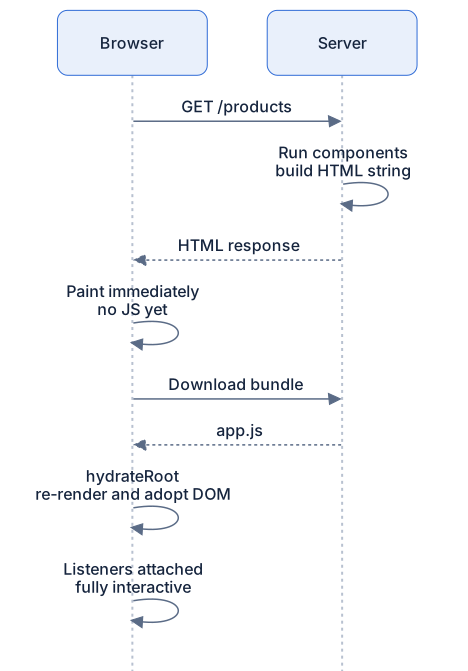
Rendered diagram (PNG hi-res):

Common misconceptions
- Misconception: SSR makes your app faster, period. Reality: it makes first content appear sooner. The same JavaScript still downloads and the whole tree still renders once, total work is strictly more, ordered better.
- Misconception: The server sends "components" to the browser. Reality: the server sends an HTML string. No component, state, or handler survives the trip, everything behavioral is rebuilt during hydration.
- Misconception: Hydration re-renders the page and replaces the DOM. Reality: hydration adopts the existing DOM. Replacement only happens for subtrees that don't match (next chapter).
- Misconception: You write separate "server components" and "client components" to use SSR. Reality: classic SSR runs your same components twice, once on the server for HTML, once in the browser for hydration. The "two kinds of components" idea is React Server Components, chapter 3, a different feature.
- Misconception: If JavaScript is disabled, a hydrated app fully works. Reality: the HTML paints and plain links/forms work, but every
onClick-driven interaction is dead until the JS runs. - Misconception:
hydrateRootis just an alias forcreateRoot. Reality: they differ in the one thing that matters, whether React creates DOM nodes or claims existing ones.
Why it works this way
- Text is the universal interface. HTML is the one thing every client, browser, crawler, preview bot, can consume without executing anything. Rendering to text makes React's output maximally portable.
- Same tree twice = verifiable adoption. Because both sides run the same components, React can walk both structures in lockstep and expect correspondence. One codebase, two materializations.
- Adoption preserves what React can't see. Scroll position, focus, form contents, text selection, state that lives in the DOM, not in React, survives hydration precisely because nodes aren't recreated.
- Listeners had to be attached late anyway. HTML can't carry functions, so interactivity was always going to wait for JavaScript. Hydration makes that wait invisible by painting the end state immediately.
Try it yourself
- In any client-rendered app, open DevTools → Network, enable cache disabling and CPU throttling, and reload. Note how long the empty
#rootsits there. Then view-source: confirm the HTML body really is nearly empty. - In an SSR app (any Next.js page works), view-source and find your component's markup right there in the HTML. Then disable JavaScript in DevTools and reload: content still appears, but try clicking a button that uses
onClick. Nothing happens. You just felt the uncanny valley. - In an SSR app, throttle the network, scroll down, and start typing into an input before hydration finishes. Once hydration completes, confirm your scroll position and typed text survived. That survival is adoption, not luck.
- Take a server-rendered page and switch its root from
hydrateRoottocreateRoot(...).render(...)(in a framework, disable SSR for a route). Reload with throttling: you'll see the server content flash away and get rebuilt. Now you know why adoption exists.
Recap
- SSR runs your same components on the server and sends real HTML: content paints before any JavaScript arrives, good for slow devices, crawlers, and link previews.
- On the server there's no DOM: React renders to a string, and event handlers can't make the trip.
- Hydration = re-render the same tree in the browser, adopt the existing server DOM, attach listeners, via
hydrateRoot, notcreateRoot. - Adoption beats recreation: no double render cost, no lost scroll/focus/form state, no flash.
- The uncanny valley: between first paint and hydration's end, the page looks alive but isn't, the reason frameworks chase time-to-interactive.
- Hydration isn't free: the full bundle downloads and the full tree renders once in the browser, no matter what.