The RSC Wire Format: Streaming UI as Data
What you'll learn
- What actually travels from the RSC server to your browser (spoiler: not HTML)
- The "Flight" model: newline-delimited rows, each a tiny JSON record
- Import rows, the tree row, and late-arriving promise rows
- How async server components stream progressively through placeholders
- Server actions:
'use server', callable references, and RPC - Why sending UI as data beats sending UI as text
Classic SSR sends HTML: text for the browser to display. React Server Components send something different: a serialized description of the UI, data the client can reconcile. Understanding this format explains a lot of how modern React frameworks behave, from progressively-appearing pages to "the server function I can call from a button."
The Flight format, conceptually
The server's response is a sequence of text lines, rows, each one a small JSON-ish record with an id and a job. This is commonly called the Flight format.
Jargon: "Flight format". The streamed, row-based serialization an RSC server emits. Each row is one record: an import reference, a chunk of the element tree, or a value that resolved late. Rows after the first can arrive in any order, and the client stitches them together.
Three row types do almost all the work:
- Import rows, "the client component
AddToCartButtonlives in bundle chunkcart.js, export namedAddToCartButton." - The tree row, the element tree itself: server components already expanded to their output; client components present as references to import rows.
- Late rows, values that weren't ready when the tree shipped. A promise gets a placeholder in the tree; when it resolves, its value streams as its own row and the placeholder fills in.
A concrete walk
Take this tree, a server Page rendering a client AddToCartButton and an async server Details:
// Server components (the default) — no directive needed.
import { AddToCartButton } from './AddToCartButton'; // a client component
import { db } from './database';

async function Details({ id }) {
  const specs = await db.specs.forProduct(id); // slow
  return <p>{specs.summary}</p>;
}

export default async function Page({ id }) {
  const product = await db.products.find(id); // fast
  return (
    <main>
      <h1>{product.name}</h1>
      <AddToCartButton productId={product.id} price={product.price} />
      <Details id={product.id} />
    </main>
  );
}
What happens, row by row:
-
The server renders
Page. Theproductquery resolves quickly. Rendering hitsAddToCartButton, a client component it can't expand, so it emits an import row. Simplified sketch, not the literal bytes:1:{"type":"import","chunk":"cart.js","name":"AddToCartButton"} -
Rendering continues into
Details, which awaits a slow query. Rather than blocking everything, the server puts a placeholder in the tree, conceptually"$L2", meaning "late row 2 will fill this", and keeps going. -
The tree row ships now, with server output expanded and references in place:
0:["main",{},{"children":[["h1",{},{"children":"Keyboard"}],["$1",{},{"productId":7,"price":49}],"$L2"]}]Read it as: "a
<main>whose children are an<h1>with text, the component described by row 1 with these (serializable!) props, and a hole that row 2 will fill." -
The client processes row 1 immediately: start downloading
cart.jsnow, before the tree even renders. It processes row 0: render the<h1>, renderAddToCartButtonas soon as its chunk lands, and where"$L2"sits, mount a Suspense-style waiting state. -
The slow query finishes. The server streams the late row:
2:["p",{},{"children":"Hot-swappable switches"}] -
The client swaps the placeholder for the resolved value and reconciles it into the live tree. No re-fetch, no re-render of the whole page. The missing piece simply arrives.
The page painted its skeleton instantly, the button's code was downloading before anyone needed it, and the slow section filled itself in. That's streaming without waterfalls: everything that can start, starts.
Pseudocode model, not real source:
Server actions: rows that point back
One more thing the format can carry: references to functions that live on the server.
import { db } from './database';

export default function ProductPage({ id }) {
  async function addToCart(formData) {
    'use server';
    await db.cart.add(id, Number(formData.get('quantity')));
  }

  return (
    <form action={addToCart}>
      <input name="quantity" type="number" defaultValue="1" />
      <button type="submit">Add to cart</button>
    </form>
  );
}
Jargon: "server action". A function marked
'use server'that stays on the server. The client receives a callable reference to it; invoking that reference sends a request (usually a POST) carrying the arguments, and the real function executes server-side.
What happens:
- The server can't serialize a function, but it can serialize a reference: "action
a1b2". The<form>'sactionin the stream is that reference id. - In the browser, the reference becomes a stub function. Calling it doesn't run code locally, it sends an RPC: a POST with the action id and the serialized arguments.
- The server looks up the real function by id and runs it, database access intact.
- For
<form action={…}>specifically, there's a bonus: plain HTML forms already know how to POST. So the action works before hydration finishes, even while JavaScript is still loading. That's progressive enhancement: the framework points the native form at the same endpoint the RPC would use.
This is the "one exception" from last chapter's serialization rule: functions can't cross the wire as code, but they can cross as return addresses.
Why data beats text
Compare what the client can do with each payload:
- HTML (classic SSR) can be displayed. To change it later, you need a full client render to diff against it, hence hydration's whole-tree cost.
- Flight rows (RSC) describe UI as data, the same species as the elements from Part 1. The client can reconcile a late row into the exact spot that suspended, merge a refreshed server render into the current page without blowing away client state, and start downloading code the instant an import row appears.
That's why the format exists: the browser receives something it can compute with, not just show. And the two server features compose: the RSC payload describes the tree; a streaming SSR pass (next chapter) renders the client components in that tree to HTML for the very first paint.
Diagram
Rendered diagram (PNG hi-res):
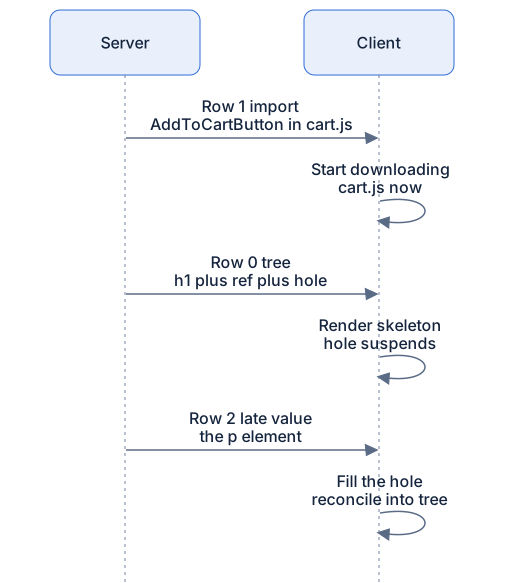
Rendered diagram (PNG hi-res):

Common misconceptions
- Misconception: RSC sends HTML to the browser. Reality: it sends serialized UI description rows. HTML may also be produced (via streaming SSR) for the first paint, but the RSC payload itself is data.
- Misconception: The format is an implementation detail you can ignore. Reality: import rows explain why client code starts downloading early, and late rows explain how async server components stream, both are visible behaviors.
- Misconception: Async server components block the whole response. Reality: a slow component becomes a placeholder plus a late row; the rest of the tree ships immediately.
- Misconception: Server actions send your function's code to the client. Reality: only a reference id crosses; calling it is an RPC back to the server, where the real code runs.
- Misconception: Server actions need JavaScript to work. Reality: wired through
<form action>, they ride plain HTML form posts, they work before hydration and gain polish after it.
Why it works this way
- Rows decouple readiness from order. Whatever is ready streams now; whatever isn't becomes a placeholder. Neither the server nor the client sits idle waiting for the slowest piece.
- Import rows front-load downloads. Naming the chunk in the stream lets the client fetch code in parallel with rendering, the waterfall dies at the source.
- Placeholders make promises first-class in UI. A not-yet-resolved value has a representable spot in the tree, so a waiting state can appear exactly there and nowhere else.
- References, not code, for actions. Shipping behavior is impossible and unsafe; shipping a capability to invoke behavior keeps the server authoritative and the client thin.
Try it yourself
- In an RSC-capable framework, add an async server component that awaits a 3-second
setTimeoutpromise, then renders. Open the Network tab and find the document/RSC response: watch it stay open and grow when the slow piece resolves. Those appended chunks are the late rows. - In that response body (DevTools → Response), find the import reference for a client component you render, a mention of its chunk and export name. Now check the JS waterfall: confirm that chunk started downloading before it was needed to render.
- Create a form with a
'use server'action. Throttle the network and submit the form while the page is still loading JavaScript. Expected: it works, you just used progressive enhancement. - Make the slow server component throw after its delay. Expected: only its boundary region shows an error or fallback; everything that already streamed stays put.
Recap
- RSC streams rows, not HTML: import rows (where client code lives), the tree row (server output expanded, client components as references), and late rows (promises resolving into placeholders).
- The client starts downloading client-component code from the import row, renders the skeleton from the tree row, and fills holes as late rows land, streaming without waterfalls.
- Async server components don't block the page: they become
"$L…"-style placeholders plus their own rows. - Server actions (
'use server') cross the wire as reference ids; calling one is an RPC, usually a POST. Through<form action>, they work pre-hydration. - UI-as-data means the client can reconcile streamed updates, merging fresh server output into a live page without losing client state.