Suspense with Transitions
What you'll learn
- The single rule that decides whether a fallback appears (most confusion lives here)
- Tab navigation with slow data: with and without
startTransition isPendingvsfallback, two different loading indicators for two different jobs- How React avoids spinner-flicker on fast connections
- A decision guide: when fallbacks are right and when transitions are right
Sometimes a suspending update shows the fallback. Sometimes React keeps the old screen and shows nothing at all until the new content is ready. That looks inconsistent. It is not a bug and it is not random. There is one rule underneath.
The rule, stated crisply
When a render suspends, React asks one question:
"Would showing the fallback HIDE content the user can already see?"
Then it applies the rule:
- Yes, it would hide existing content, and this update is a transition (or a retry of one) → React does not commit the fallback. It keeps the current screen fully alive and lets the new render finish in the background. The user sees the old UI until the new UI is completely ready.
- No existing content at stake (initial mount), or the update is urgent (a plain
setState) → the fallback commits, exactly as the last two chapters described.
Fallbacks are for content that has never been seen. Transitions are for getting from one visible screen to another without ripping the first one away.
Jargon: "transition". A state update marked as non-urgent with
startTransition. React may interrupt it, deprioritize it, and, crucially for this chapter, refuse to replace already-visible content with a fallback because of it. (The full machinery is in the concurrency chapters of Part 4.)
The tab navigation walkthrough
The classic scenario: two tabs, and Tab B's data is slow.
import { Suspense, use, useState, startTransition } from 'react';

const cache = new Map();
function fetchTabData(tab) {
  if (!cache.has(tab)) {
    cache.set(
      tab,
      new Promise((resolve) =>
        setTimeout(() => resolve(`Contents of ${tab}`), 2000)
      )
    );
  }
  return cache.get(tab);
}

function TabPanel({ tab }) {
  const contents = use(fetchTabData(tab)); // suspends ~2s per tab
  return <div className="panel">{contents}</div>;
}

export default function Tabs() {
  const [tab, setTab] = useState('Tab A');

  function selectTab(next) {
    startTransition(() => {
      setTab(next); // non-urgent: allowed to finish in the background
    });
  }

  return (
    <div>
      <button onClick={() => selectTab('Tab A')}>Tab A</button>
      <button onClick={() => selectTab('Tab B')}>Tab B</button>

      <Suspense fallback={<p>Loading tab…</p>}>
        <TabPanel tab={tab} />
      </Suspense>
    </div>
  );
}
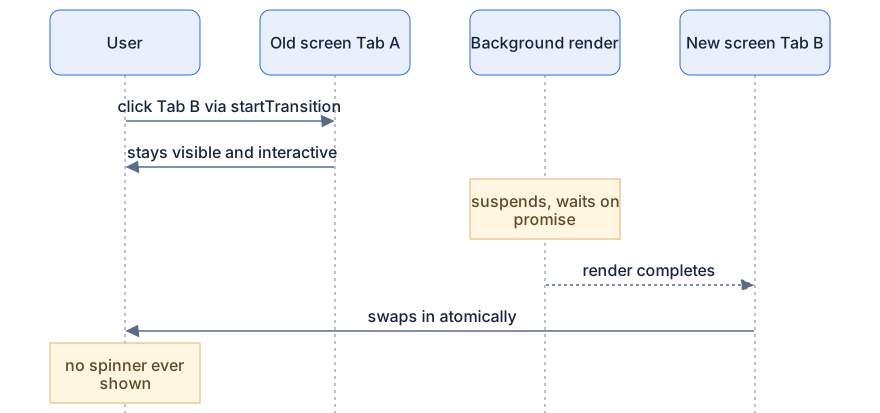
What happens (transition version):
- You're looking at Tab A. It's on screen, visible content exists.
- You click Tab B.
startTransitionmarks the update as non-urgent. - React starts rendering
TabPanelwith'Tab B'in the background.use()throws, Tab B's data is 2 seconds away. - React asks the question: would committing
<p>Loading tab…</p>hide visible content? Yes, Tab A would vanish. - Because this is a transition, React keeps Tab A on screen. Fully rendered, fully interactive. The background render waits on the promise.
- Two seconds pass; the promise resolves; the background render completes.
- React commits the finished Tab B. The swap is instant and total, no spinner ever appeared.
Now delete the startTransition wrapper so setTab is a plain urgent update:
function selectTab(next) {
  setTab(next); // urgent: React must reflect this NOW
}
What happens (urgent version):
- You click Tab B.
- React renders,
use()throws, but this update is urgent; React isn't allowed to just wait around with a stale screen. - The fallback commits. Tab A vanishes, replaced by "Loading tab…" for 2 seconds.
- Tab B swaps in.
Same component, same cache, same network speed. The only difference is whether the update was marked as a transition, and it completely changes what the user experiences. The urgent version feels broken ("where did my tab go?"). The transition version feels instant ("the app just... changed when it was ready").
isPending vs fallback: two indicators, two jobs
startTransition's hook form hands you a boolean:
import { Suspense, use, useState, useTransition } from 'react';

// fetchTabData and TabPanel as before
import { fetchTabData, TabPanel } from './tabData';

export default function Tabs() {
  const [tab, setTab] = useState('Tab A');
  const [isPending, startTransition] = useTransition();

  function selectTab(next) {
    startTransition(() => setTab(next));
  }

  return (
    <div style={{ opacity: isPending ? 0.6 : 1 }}>
      <button onClick={() => selectTab('Tab A')}>Tab A</button>
      <button onClick={() => selectTab('Tab B')}>Tab B</button>

      <Suspense fallback={<p>Loading tab…</p>}>
        <TabPanel tab={tab} />
      </Suspense>
    </div>
  );
}
What happens:
- You click Tab B.
isPendingflips totrueimmediately (that's the urgent part of the update). - The whole tab area dims to 60%, a subtle "working on it" signal, while Tab A stays fully visible and clickable.
- When Tab B's render completes in the background,
isPendingflips back tofalseand the new panel appears, brightness restored.
Now you can see the division of labor:
fallbackis a wholesale replacement: the content is gone, a placeholder occupies its slot. Right for "this has never been on screen".isPendingis a small in-place indicator you control: dim the panel, spin an icon in the tab label, disable a button. Right for "something you can see is being replaced".
For navigation between already-good screens, you almost always want the second. A full-screen spinner for a tab click is using a sledgehammer where a dimmer switch exists.
The throttling concept: no spinner-flicker
One more piece of visible polish. Take a load that takes 80ms. If React committed the fallback the instant a render suspended, users would see: content → spinner (for 80ms) → content. A subliminal flash of spinner that's worse than no spinner. It reads as a glitch.
React's countermove, stated simply:
If a fallback would show but the content arrives quickly, React delays the fallback briefly so it never flashes.
The boundary effectively says: "I'll give this a short grace period before I commit to showing a spinner." Fast connections and cached data therefore produce zero visible loading UI, things just appear. Slow connections still get an honest spinner after the grace period. You don't configure any of this; it's the boundary being polite on your behalf.
This is also why the transition rule exists in the first place. Hiding-and-restoring visible content is the most extreme version of flicker: Tab A → spinner → Tab B is a jarring two-step. Transitions extend the grace period to "as long as it takes", because for non-urgent updates the old screen is a perfectly good placeholder.
The decision guide
Keep it this simple:
- Initial load / first mount (nothing visible yet, or a deliberately skeleton-shaped region): use a fallback. A skeleton screen or spinner is correct, there's no old content to preserve.
- Subsequent navigation or refresh (good content already on screen): wrap the update in a transition, and prefer
isPendingfor your loading indication. The old screen holds the fort; the new one swaps in atomically. - Never reach for a bigger fallback to "fix" flicker, reach for a transition. The flicker was React telling you the update was marked more urgent than it deserved.
Diagram
Rendered diagram (PNG hi-res):

Rendered diagram (PNG hi-res):
Common misconceptions
- Misconception: React sometimes "forgets" to show the fallback. Reality: it deliberately withholds the fallback when committing it would hide visible content during a transition, that restraint is the feature.
- Misconception:
startTransitionmakes data load faster. Reality: the network takes the same 2 seconds; transitions change what the user looks at during those seconds. - Misconception:
isPendingandfallbackare interchangeable loading spinners. Reality:isPendingis a small in-place indicator on the current screen;fallbackis a wholesale replacement of content, they serve different moments. - Misconception: Seeing a fallback flash means your data layer is misconfigured. Reality: brief flashes usually mean an urgent update should have been a transition; fast loads already get flicker protection from the boundary.
- Misconception: The old screen is frozen while a transition pends. Reality: it stays fully interactive, you can even click a third tab, and React will abandon the outdated background render.
- Misconception: You should wrap every
setStateinstartTransition. Reality: only updates that can wait a frame (or a fetch) belong in transitions; typing into an input must stay urgent.
Why it works this way
- Visible content is precious. Taking working UI away from a user to show a spinner is a regression, not progress. The rule encodes a simple ethic: never replace something with nothing.
- Urgency is information. By splitting updates into urgent vs transition, you tell React which screens may be waited for, and React spends that information exactly where it matters: on fallback decisions.
- Background rendering makes it implementable. Because renders are pure and disposable, React can hold a half-finished Tab B in memory indefinitely without affecting the Tab A you're using. The concurrency machinery (Part 4) is what the rule stands on.
- Grace periods respect human perception. A spinner that appears for 80ms communicates nothing but "the app glitched". Delaying fallbacks costs a little honesty on slow loads and buys back trust on fast ones.
Try it yourself
- Build the
Tabsexample with the 2-second fake fetch. Click between tabs withstartTransition. Expected: the current tab stays put, then the new one pops in, no spinner. - Remove
startTransitionand repeat. Expected: the current tab vanishes instantly, the fallback shows for 2 seconds. Same app, wildly different feel. - Add
useTransitionand dim the panel whileisPending. Expected: immediate feedback on click (the dim), old content preserved, atomic swap on completion. - Drop the fake delay to 50ms and use an urgent update. Expected: you barely see the fallback at all, the grace period swallows it. Now you know spinner-flicker protection when you see it.
Recap
- The rule: if committing a fallback would hide visible content and the update is a transition, React keeps the old screen and waits; otherwise the fallback commits.
- Transitions turn tab navigation into "old screen stays → new screen swaps in", with no spinner at all.
isPending= small in-place indicator you control;fallback= wholesale content replacement.- React briefly delays fallbacks so fast loads never produce spinner-flicker.
- Initial load → fallback is fine. Navigation between visible screens → transition plus
isPending. - Flicker and vanishing-content bugs are almost always an urgent update that wanted to be a transition.