setState Is a Request, Not a Change
What you'll learn
- What
setStateactually does: enqueue a request and schedule a render, not mutate anything - Why three
setCount(count + 1)calls in one click add only 1 - How functional updates
setCount(c => c + 1)produce the correct +3 - Batching: many updates in one task become one re-render, everywhere, since React 18
- Why reading state right after
setStatealways gives the old value - When
flushSyncis the (rare) escape hatch
A click handler calls setCount(count + 1) three times, and the count goes up by one. People reach for "async" and "weird timing". Timing is not the issue. Model setState as sending a request instead of assigning a variable, and every one of these puzzles dissolves.
The famous +1-not-+3 experiment
Run this and watch the console:
import { useState } from 'react';

function Counter() {
  const [count, setCount] = useState(0);
  console.log('RENDER: count =', count);

  function handleClick() {
    setCount(count + 1);
    console.log('after 1st set, count =', count);
    setCount(count + 1);
    console.log('after 2nd set, count =', count);
    setCount(count + 1);
    console.log('after 3rd set, count =', count);
  }

  return <button onClick={handleClick}>Count: {count}</button>;
}
The console shows:
RENDER: count = 0
after 1st set, count = 0
after 2nd set, count = 0
after 3rd set, count = 0
RENDER: count = 1
What happens:
- Render:
countis the constant0for this entire function execution, the snapshot from last chapter. - Click: the handler runs inside that snapshot. Each
setCount(count + 1)computes0 + 1and sends the request "make it 1". - Three identical requests arrive:
[1, 1, 1]. - After the handler finishes, React processes the queue: last request wins, final value
1. - One re-render runs with
count = 1.
setState is not assignment. It's sending a message: "when you next render, please make this state's value X." Nothing in the current render changes, count is a const bound to this render's snapshot.
Jargon: "update queue". A per-state-cell list of requested changes. Your setters push requests onto it; React applies them, in order, the next time it renders that component.
Pseudocode model, not real source:
Functional updates: request a calculation, not a value
Now swap the plain value for an updater function:
import { useState } from 'react';

function Counter() {
  const [count, setCount] = useState(0);

  function handleClick() {
    setCount(c => c + 1);
    setCount(c => c + 1);
    setCount(c => c + 1);
  }

  return <button onClick={handleClick}>Count: {count}</button>;
}
What happens:
- The queue receives three functions, not numbers:
[c => c + 1, c => c + 1, c => c + 1]. - At processing time, the moment React prepares the next render, it runs them in order, feeding each the previous result:
0 → 1 → 2 → 3. - Final value
3. Still exactly one re-render.
The updater never reads the stale closure variable. It runs at processing time with the freshest queued value, so it doesn't matter that the handler's snapshot said 0.
Jargon: "functional update" (updater function). Passing a function to a setter instead of a value. React calls it with the latest queued value when processing the queue:
setCount(c => c + 1).
Rule of thumb: if the next state depends on the previous state, use a functional update.
Batching: many requests, one render
What if you set two different states in one handler?
import { useState } from 'react';

function Profile() {
  const [name, setName] = useState('');
  const [age, setAge] = useState(0);
  console.log('RENDER', name, age);

  function handleClick() {
    setName('Ada');
    setAge(36);
  }

  return <button onClick={handleClick}>Fill in</button>;
}
What happens:
- Click: two requests land on two different cells, and a render is scheduled.
- React waits for the handler to finish, then renders once with both values applied.
- The console shows a single
RENDER Ada 36line, never an intermediateRENDER Ada 0.
Jargon: "batching". Collecting all state updates made during one task and processing them together in a single re-render, instead of one render per update.
Since React 18, batching applies everywhere, including promises and timeouts, which were unbatched in earlier versions:
import { useState } from 'react';

function Profile() {
  const [name, setName] = useState('');
  const [age, setAge] = useState(0);
  console.log('RENDER', name, age);

  function handleClick() {
    setTimeout(() => {
      setName('Ada');
      setAge(36);
      // React 18+: still ONE re-render for both updates
    }, 1000);
  }

  return <button onClick={handleClick}>Load later</button>;
}
What happens: one second after the click, both updates land and a single RENDER line appears. Before React 18, updates inside a timeout would each have triggered their own render, one of the quiet headline changes of that release.
Reading state right after setState
Predict the alert before running:
import { useState } from 'react';

function Counter() {
  const [count, setCount] = useState(0);

  function handleClick() {
    setCount(count + 1);
    alert('You clicked at count = ' + count);
  }

  return <button onClick={handleClick}>Count: {count}</button>;
}
What happens:
- First click: the alert says
0, then the screen updates to1. countin the handler is this render's constant. The request only affects the next render.- There is no API to "read the value you just set" inside the handler, if you need it, compute it yourself first (
const next = count + 1) and use that variable for both the setter and the alert.
The 3-second alert bug
The snapshot follows closures into the future:
import { useState } from 'react';

function Counter() {
  const [count, setCount] = useState(0);

  function handleClick() {
    setCount(count + 3);
    setTimeout(() => {
      alert('Three seconds ago, count was ' + count);
    }, 3000);
  }

  return <button onClick={handleClick}>Count: {count}</button>;
}
What happens:
- Click at
0: the screen soon shows3. - Three seconds later the alert fires, and says
0. - The timeout callback closed over this render's
count, which is0forever. JavaScript closures capture the binding from the render that created them. - This is not a React bug. It's ordinary closures plus the snapshot model: every render's handlers see that render's state.
To show the new value, capture it before scheduling: const next = count + 3; setCount(next); then alert next. To act on the latest value at execution time, use a functional update or a ref, the deep dive chapters cover both.
flushSync: the rare escape hatch
Very occasionally you need the DOM updated right now, to measure a node you just added, or to scroll it into view before the browser paints something else. flushSync forces React to flush pending updates synchronously:
import { useState } from 'react';
import { flushSync } from 'react-dom';

function TodoList() {
  const [items, setItems] = useState(['first']);

  function handleAdd() {
    flushSync(() => {
      setItems([...items, 'second']);
    });
    // The DOM already contains the new item at this line.
  }

  return (
    <ul>
      {items.map(item => <li key={item}>{item}</li>)}
    </ul>
  );
}
What happens: the update inside flushSync is rendered and committed before the next line runs, so measuring or scrolling code sees the fresh DOM. The cost: it breaks batching and can force React to do work at awkward times. Reach for it only when you can name the exact DOM you need immediately; the concurrency part of this series explains the machinery it bypasses.
Diagram
Rendered diagram (PNG hi-res):
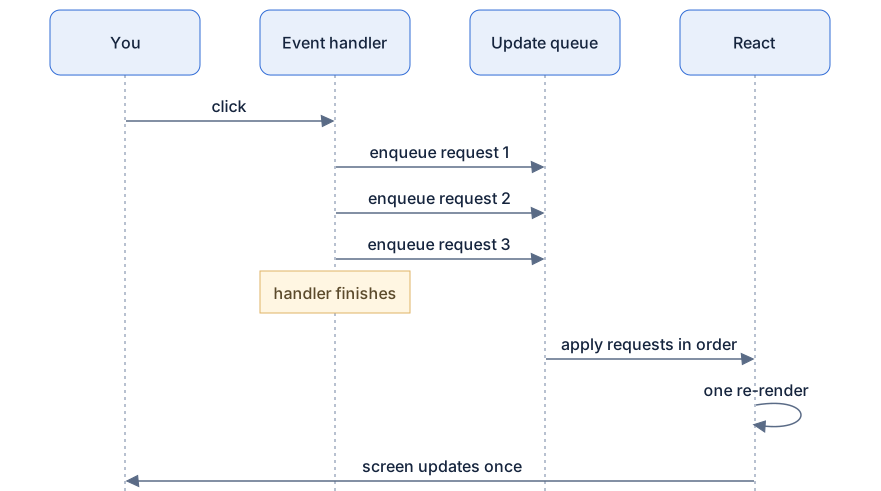
Rendered diagram (PNG hi-res):

Common misconceptions
- Misconception:
setStatechanges state immediately. Reality: it enqueues a request; the new value exists only from the next render onward. - Misconception:
setStateis "asynchronous" likesetTimeout. Reality: it's not about threads or timers, it's snapshot semantics. The value in this render can never change, period. - Misconception: Several
setStatecalls cause several re-renders. Reality: updates in the same task batch into one render, since React 18, even inside timeouts and promises. - Misconception:
c => c + 1is just a stylistic preference. Reality: the updater runs at processing time with the latest queued value, the only correct tool when the next state depends on the previous. - Misconception: You can read fresh state right after setting it. Reality: the identifier in your handler is bound to this render's snapshot forever.
- Misconception: The 3-second alert showing the old count is a React bug. Reality: it's plain JavaScript closures over per-render constants.
Why it works this way
- Consistency within a render. If state could change mid-render, the JSX above and below the change would describe two different worlds in one pass.
- Batching is performance. Real handlers often set several states; one render per set would multiply work and flash intermediate UI at the user.
- Requests instead of mutation let React choose when to render. That scheduling freedom is what later enables priorities, interruption, and transitions in the concurrency chapters.
- Snapshots plus queues keep concurrency coherent. React can pause a render halfway and resume later, and the queued updates still apply cleanly on top.
- Functional updates move computation to the only moment the latest value exists, processing time, so correctness never depends on which render's closure ran.
Try it yourself
- Run the three-
setCountexample. Before clicking, write down all five expected log lines; compare with reality. - Swap to functional updates and confirm each click adds exactly 3, still with a single
RENDERline. - In the batching example, add a third and fourth
setStatecall. Still oneRENDERper click. - Reproduce the 3-second alert bug, then fix it by computing
const next = count + 3first and alertingnext. Explain to a rubber duck why the fix works.
Recap
setState= enqueue a request + schedule a re-render. It never mutates the current render's value.- Three
setCount(count + 1)in one click → queue[1, 1, 1]→ result1. - Three
setCount(c => c + 1)→ updaters run in order at processing time → result3. - All updates in one task batch into a single re-render, in React 18+, even inside timeouts and promises.
- Reading state after
setStategives this render's snapshot, forever, even inside later timers. flushSyncforces an immediate synchronous flush; rare, and only for DOM-measuring edge cases.