useLayoutEffect and the Paint Timeline
What you'll learn
- The exact order of one update: render → commit → layout effects → paint → passive effects
- What
useLayoutEffectis for: DOM reads and writes that must be invisible to the user - The classic "tooltip flicker" bug, and why swapping one hook fixes it
- Why DOM measurement belongs in layout effects, and what that costs
- A decision table: which effect timing for which job
You build a tooltip. The code is correct. Yet sometimes, for a single frame, the tooltip flashes in the top-left corner before jumping to its proper place. The bug is not what your code does. It is when it does it. This chapter covers the two effect timings React gives you, and the browser paint that sits between them.
One update, five moments
When state changes and React updates the page, the work happens in a strict order. Learn this order once and a whole family of visual glitches stops being mysterious.
The timeline:
- Render. React calls your component functions, collects the new element tree, and diffs it against the previous one. Nothing real has changed yet, this is all description work in JavaScript.
- Commit. React applies the computed changes to the real DOM: nodes are created, updated, removed. At this instant the DOM is already new, but the user has seen nothing, because the browser has not painted yet.
- Layout effects fire. Every
useLayoutEffectcallback runs, synchronously, right now. If one of them sets state, React re-renders and re-commits synchronously, still before paint. - Paint. The browser turns DOM + CSS into pixels. This is the first moment the user can see anything.
- Passive effects fire. Your
useEffectcallbacks run, asynchronously, after the frame is already on screen.
Jargon: "commit". The phase where React applies the changes it computed during render to the real DOM. Before commit, everything was descriptions; after commit, actual nodes on the page have changed.
Jargon: "paint". The browser converting the DOM into pixels on your screen. Users only ever see paints. Everything that happens before the next paint is invisible to them, no matter how much the DOM changed.
Jargon: "passive effects". React's internal name for
useEffectcallbacks. "Passive" because they don't block anything: they are scheduled to run after paint, whenever the browser gets to them.
Pseudocode model, not real source:
The useful fact: between step 2 and step 4 there is a window where the DOM is new but nothing has been painted. Code that runs in that window can read the real layout and adjust the DOM, and the user never sees the intermediate state, because no paint happened in between. useLayoutEffect is the only hook that lives in that window.
The flicker demo
A tooltip that positions itself under a button. It measures the button in a plain useEffect:
import { useEffect, useRef, useState } from 'react';

function Tooltip({ text, targetRef }) {
  const tipRef = useRef(null);
  const [pos, setPos] = useState({ top: 0, left: 0 });

  useEffect(() => {
    const target = targetRef.current.getBoundingClientRect();
    setPos({ top: target.bottom + 8, left: target.left });
  }, [text, targetRef]);

  return (
    <div ref={tipRef} className="tooltip" style={{ top: pos.top, left: pos.left }}>
      {text}
    </div>
  );
}

export default function App() {
  const buttonRef = useRef(null);
  const [text, setText] = useState('Save your work');

  return (
    <div>
      <button
        ref={buttonRef}
        onClick={() =>
          setText(text === 'Save your work' ? 'Shortcut: Ctrl+S' : 'Save your work')
        }
      >
        Hover target
      </button>
      <Tooltip text={text} targetRef={buttonRef} />
    </div>
  );
}
What happens:
- First render:
posis{ top: 0, left: 0 }. Commit places the tooltip div at the top-left of the page. TheuseEffectis scheduled but has not run. - The browser paints. The user sees the tooltip at 0,0 for one frame.
- Only now does the
useEffectrun: it measures the button and callssetPos. - React re-renders and re-commits with the real coordinates; the browser paints again.
- Net result: two paints, one wrong, one right, and a visible one-frame "jump".
The fix: same code, different timing
Change exactly one thing, the hook:
import { useLayoutEffect, useRef, useState } from 'react';

function Tooltip({ text, targetRef }) {
  const tipRef = useRef(null);
  const [pos, setPos] = useState({ top: 0, left: 0 });

  useLayoutEffect(() => {
    const target = targetRef.current.getBoundingClientRect();
    setPos({ top: target.bottom + 8, left: target.left });
  }, [text, targetRef]);

  return (
    <div ref={tipRef} className="tooltip" style={{ top: pos.top, left: pos.left }}>
      {text}
    </div>
  );
}

export default function App() {
  const buttonRef = useRef(null);
  const [text, setText] = useState('Save your work');

  return (
    <div>
      <button
        ref={buttonRef}
        onClick={() =>
          setText(text === 'Save your work' ? 'Shortcut: Ctrl+S' : 'Save your work')
        }
      >
        Hover target
      </button>
      <Tooltip text={text} targetRef={buttonRef} />
    </div>
  );
}
What happens:
- First render:
posis{ top: 0, left: 0 }. Commit places the tooltip at the top-left, but no paint has happened. - The layout effect runs synchronously: it measures the button and calls
setPos. - Because a layout effect set state, React immediately re-renders and re-commits. The DOM now holds the final coordinates. Still no paint.
- The browser paints exactly once, with the tooltip already under the button.
- The 0,0 position existed in the DOM for a few microseconds, but it never reached the screen. No flicker.
Same work, same number of renders, the only difference is that the correction happened before the single paint instead of after the first of two paints.
Measuring the DOM belongs here
Any time you read geometry, getBoundingClientRect, scrollHeight, offsetWidth, and the answer changes what you render, the read belongs in a layout effect:
import { useLayoutEffect, useRef, useState } from 'react';

function ClampBox({ text }) {
  const boxRef = useRef(null);
  const [overflows, setOverflows] = useState(false);

  useLayoutEffect(() => {
    const el = boxRef.current;
    // scrollHeight: full content height — clientHeight: visible height
    setOverflows(el.scrollHeight > el.clientHeight);
  }, [text]);

  return (
    <div>
      <div ref={boxRef} className="clamp">{text}</div>
      {overflows && <button>Show more</button>}
    </div>
  );
}

export default function App() {
  return (
    <ClampBox text="A long product description that absolutely does not fit inside the clamped preview box, so the clamp overflows and the button must appear." />
  );
}
(With CSS like .clamp { max-height: 3em; overflow: hidden; }.)
What happens:
- The clamped text is committed to the DOM, measurable, but unpainted.
- The layout effect measures: content height vs visible height.
- If the text overflows,
setOverflows(true)triggers a synchronous re-render and re-commit, adding the button. - One paint shows the final UI. The "Show more" button never pops in a frame late.
Why not measure during render? Because during render the DOM node does not exist yet, on the first render your ref is still null. The layout effect is the earliest moment a committed, measurable DOM exists. And why not a passive useEffect? Because then the measurement-driven change lands a paint late, the same flicker family as the tooltip.
Jargon: "layout" (a.k.a. reflow). The browser computing geometry: the size and position of every box on the page. Reading
getBoundingClientRectforces the browser to have up-to-date geometry, which is why measuring is only meaningful on a real, committed DOM.
The cost: layout effects block paint
Step 3 of the timeline is synchronous, which cuts both ways. Anything slow inside a layout effect delays the paint, the user keeps staring at the old frame (or a blank screen on first load):
import { useLayoutEffect, useState } from 'react';

export default function App() {
  const [n, setN] = useState(0);

  useLayoutEffect(() => {
    const start = performance.now();
    while (performance.now() - start < 200) {} // 200ms of busy work
  });

  return (
    <button onClick={() => setN(n + 1)}>
      Clicked {n} times — try me
    </button>
  );
}
What happens: every click freezes the page for 200ms before the number on the button changes, because the busy loop runs between commit and paint. Move the same loop into a useEffect and the number updates instantly, the freeze still happens, but after the paint, off the critical path. That difference is the entire cost model: a layout effect is a promise that your work is small enough to sit between the user and their pixels.
A third, rarer timing
There is actually a third effect timing, and you will probably never call it directly. Insertion effects (useInsertionEffect) fire inside the commit, before React mutates the DOM, earlier than layout effects. They exist so CSS-in-JS libraries can inject <style> rules before new nodes appear and before any layout effect measures styles. It is library-author machinery; as an application developer, file it under "good to know it exists" and move on.
Decision table
| Your effect… | Use |
|---|---|
| Fetches data, subscribes, sets timers, logs, syncs non-visual state | useEffect (the default) |
Reads layout (getBoundingClientRect, sizes, scroll position) and the answer changes what renders | useLayoutEffect |
| Adjusts the DOM synchronously so the user never sees an intermediate frame | useLayoutEffect |
Injects <style> rules for a CSS-in-JS library | insertion effect (library territory) |
| You are not sure | useEffect |
Diagram
Rendered diagram (PNG hi-res):
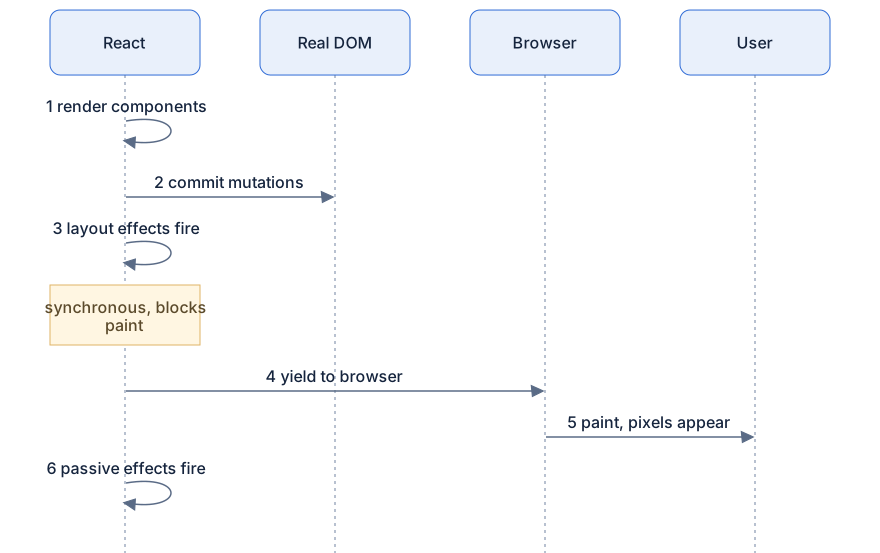
Rendered diagram (PNG hi-res):

Common misconceptions
- Misconception:
useLayoutEffectruns before React updates the DOM. Reality: it runs after the DOM is mutated but before the browser paints, inside it, the DOM is already the new one. - Misconception:
useEffectruns immediately after render. Reality: it is deferred; it runs after the browser has painted, asynchronously. - Misconception:
useLayoutEffectis a faster, betteruseEffect. Reality: it blocks paint; heavy work there directly delays what the user sees. It is a precision tool, not an upgrade. - Misconception: every DOM read needs a layout effect. Reality: reading layout inside an event handler (say, on click) is also fine, layout effects matter specifically for reads whose results must be painted in the same frame.
- Misconception: layout effects run during server rendering. Reality: there is no DOM and no paint on the server, so they never run there; React warns in development when a server-rendered component uses one.
Why it works this way
- The window between commit and paint is the only moment where "read the real DOM, then fix the real DOM" is invisible. React gives you exactly one hook that lives in that window.
- Deferring
useEffectpast the paint keeps the common cases, fetching, subscriptions, timers, off the critical path to pixels. - The synchronous re-render from a layout effect is intentional: if the correction had to wait for another asynchronous round-trip, the flicker would come back.
- You cannot measure during render because the DOM does not exist yet; measurement requires a committed tree. That constraint is why the timing exists at all.
Try it yourself
- Build the tooltip demo with
useEffect. In DevTools, throttle the CPU 4–6× and click the button repeatedly: you can catch the tooltip at the top-left for a frame. Swap touseLayoutEffect, the flash is gone. - Add
console.logwithperformance.now()in the render body, in a layout effect, and in a passive effect. Observe the order: render → layout effect → (paint) → passive effect. - Run the 200ms busy-loop example with the loop in
useLayoutEffect(the page freezes before the number changes), then move the loop intouseEffect(the number updates, then the freeze). Feel both in one file. - In
ClampBox, move the measurement into auseEffectand watch the "Show more" button pop in a frame late on first mount.
Recap
- One update = render → commit (DOM mutated) → layout effects → paint → passive effects.
useLayoutEffectruns synchronously after DOM mutation, before paint: reads and writes there are invisible to the user.- The flicker pattern: paint at a placeholder position, then correct in
useEffect, the user sees both frames.useLayoutEffectcollapses it to one. - Measure the DOM in layout effects: not during render (no DOM yet), not in passive effects when the result is visual.
- Layout effects block paint, keep them tiny, and default to
useEffect. - Insertion effects are a third, earlier timing reserved for CSS-in-JS libraries.
- Rule of thumb:
useEffectunless you must measure or synchronously adjust the DOM before the user sees it.